代理服务器搭建指南
正向代理服务器(Forward proxy)
正向代理主要是将内网的访问请求通过代理服务器转发访问并返回结果。通常客户端无法直接访问外部的服务器,客户端通过代理服务器访问外部服务器,需要在客户端的浏览器中设置代理服务器。
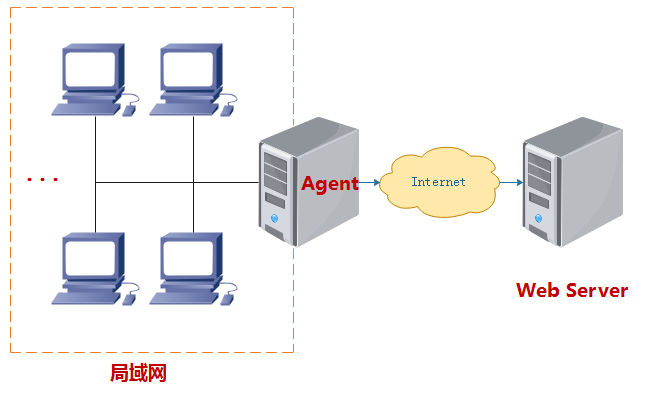
正向代理服务器是客户端的代理,代理服务器代表客户端与真是服务器通讯。
客户端知道真实服务器但不直接访问真实服务器,而是有将请求告知代理服务器,再有代理服务器向真实服务器发起请求。
CentOS 7 Squid搭建代理服务器
安装squid
[root@ecs ~]# yum install -y squid指定放行网段
允许局域网内指定网段的机器使用代理服务器,
http_access deny all必须放在最后。[root@ecs ~]# cat > /etc/squid/squid.conf << EOF acl mynet src 192.168.1.0/24 http_access allow localnet http_access allow localhost http_access deny all EOF设置监听端口
[root@ecs ~]# sed -i '/http_port/chttp_port 0.0.0.0:3128' /etc/squid/squid.conf0.0.0.0表示监听所有IPv4地址,包括公网IP。启用用户认证
[root@ecs ~]# yum install -y httpd-tools
[root@ecs ~]# htpasswd -c /etc/squid/passwd maisi
[root@ecs ~]# chown squid:squid /etc/squid/passwd
[root@ecs ~]# chmod 640 /etc/squid/passwd
[root@ecs ~]# sed -i '1i\
auth_param basic program /usr/lib64/squid/basic_ncsa_auth /etc/squid/passwd\
auth_param basic realm "Squid Proxy Authentication"\
acl authenticated proxy_auth REQUIRED\
http_access allow authenticated' /etc/squid/squid.conf
启用用户认证后,可以注释掉:
http_access allow localnet。启动服务
[root@ecs ~]# systemctl enable --now squid防火墙放行端口
[root@ecs ~]# firewall-cmd --permanent --add-port=3128/tcp
[root@ecs ~]# firewall-cmd --reload
云服务器(阿里云、华为云等)务必在安全组中放行TCP 3128端口。
查看日志
[root@ecs ~]# tail -f /var/log/squid/access.log
[root@ecs ~]# tail -f /var/log/squid/cache.log
客户端测试
[root@ecs ~]# export http_proxy=http://maisi:yOS4WfuAU0pVtjpt@139.196.100.56:3128 [root@ecs ~]# curl ifconfig.me重要说明:Squid默认支持https访问,但工作方式不同于http。https使用http connect方法,建立到目标https服务器的Tunnel,不解析、不缓存、不修改https数据流,加密与解密仍由客户端与目标服务器完成。
[root@ecs ~]# curl -v -x http://maisi:yOS4WfuAU0pVtjpt@139.196.100.56:3128 -I https://ipinfo.io
* About to connect() to proxy 139.196.100.56 port 3128 (#0)
*   Trying 139.196.100.56...
* Connected to 139.196.100.56 (139.196.100.56) port 3128 (#0)
* Establish HTTP proxy tunnel to ipinfo.io:443
* Proxy auth using Basic with user 'maisi'
> CONNECT ipinfo.io:443 HTTP/1.1
> Host: ipinfo.io:443
> Proxy-Authorization: Basic bWFpc2k6eU9TNFdmdUFVMHBWdGpwdA==
> User-Agent: curl/7.29.0
> Proxy-Connection: Keep-Alive
>
< HTTP/1.1 200 Connection established
HTTP/1.1 200 Connection established
<

* Proxy replied OK to CONNECT request
* Initializing NSS with certpath: sql:/etc/pki/nssdb
*   CAfile: /etc/pki/tls/certs/ca-bundle.crt
CApath: none
* SSL connection using TLS_ECDHE_RSA_WITH_AES_128_GCM_SHA256
* Server certificate:
*       subject: CN=ipinfo.io
*       start date: 8月 01 14:39:08 2026 GMT
*       expire date: 10月 30 14:39:07 2026 GMT
*       common name: ipinfo.io
*       issuer: CN=YR2,O=Let's Encrypt,C=US
> HEAD / HTTP/1.1
> User-Agent: curl/7.29.0
> Host: ipinfo.io
> Accept: */*
>
< HTTP/1.1 200 OK
HTTP/1.1 200 OK
< access-control-allow-origin: *
access-control-allow-origin: *
< content-type: application/json
content-type: application/json
< Content-Length: 278
Content-Length: 278
< date: Sat, 08 Aug 2026 05:04:04 GMT
date: Sat, 08 Aug 2026 05:04:04 GMT
< via: 1.1 google
via: 1.1 google
< Alt-Svc: h3=":443"; ma=2592000
Alt-Svc: h3=":443"; ma=2592000

<
* Connection #0 to host 139.196.100.56 left intact
客户端访问Squid,Squid发送
CONNECT ipinfo.io:443 HTTP/1.1,与ipinfo.io:443建立tcp连接,之后Squid仅转发原始字节流。
CentOS 7 nginx搭建代理服务器
创建用户
[root@ecs ~]# mkdir -p /etc/nginx
[root@ecs ~]# htpasswd -c /etc/nginx/passwd maisi
删除用户
[root@ecs ~]# htpasswd -D /etc/nginx/passwd maisinginx配置
[root@ecs ~]# cat > "/usr/local/nginx/conf/conf.d/proxy.conf" << EOF
server {
    listen 3128;
    resolver 8.8.8.8 114.114.114.114 valid=30s;

    # 启用Basic Auth
    auth_basic "";
    auth_basic_user_file /etc/nginx/passwd;

    location / {
        proxy_pass \$scheme://\$http_host\$request_uri;
        proxy_set_header Host \$http_host;
        proxy_set_header X-Real-IP \$remote_addr;
        proxy_set_header X-Forwarded-For \$proxy_add_x_forwarded_for;
        proxy_set_header X-Forwarded-Proto \$scheme;
        proxy_http_version 1.1;
    }
}
EOF
客户端测试
[root@ecs ~]# curl -v -x http://139.196.100.56:3128 -u maisi:yOS4WfuAU0pVtjpt ifconfig.me
* About to connect() to proxy 139.196.100.56 port 3128 (#0)
*   Trying 139.196.100.56...
* Connected to 139.196.100.56 (139.196.100.56) port 3128 (#0)
* Server auth using Basic with user 'maisi'
> GET HTTP://ifconfig.me/ HTTP/1.1
> Authorization: Basic bWFpc2k6eU9TNFdmdUFVMHBWdGpwdA==
> User-Agent: curl/7.29.0
> Host: ifconfig.me
> Accept: */*
> Proxy-Connection: Keep-Alive
>
< HTTP/1.1 200 OK
< Server: nginx/1.30.4
< Date: Sat, 08 Aug 2026 05:36:45 GMT
< Content-Type: text/plain
< Content-Length: 14
< Connection: keep-alive
< access-control-allow-origin: *
< via: 1.1 google
<
* Connection #0 to host 139.196.100.56 left intact
curl -U或者curl -x http://username:password@host:port方式发送的是Proxy-Authorization: Basic,而nginx不认Proxy-Authorization: Basic,因此会报错:401 Authorization Required。虽然
curl -u发送的Authorization: Basic能通过验证,但是客户端默认发送的是Proxy-Authorization: Basic,nginx并不支持,因此不推荐使用nginx作为正向代理服务器。
反向代理服务器(Reverse proxy)
反向代理主要是将外网对代理服务器的访问转发到同局域网的服务器。通常客户端通过外网可以访问代理服务器,但无法访问局域网内的服务器。反向代理对客户端透明,客户端不用做任何设置,因此客户端访问代理就像访问目标服务器一样。
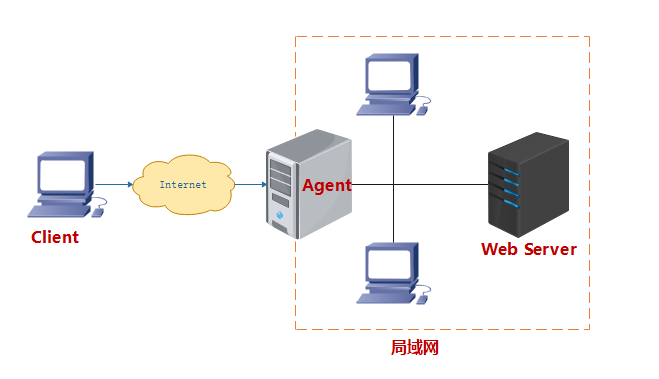
反向代理服务器是服务端的代理,代理服务器代表服务器与客户端通讯。